Your new favorite Minecraft launcher
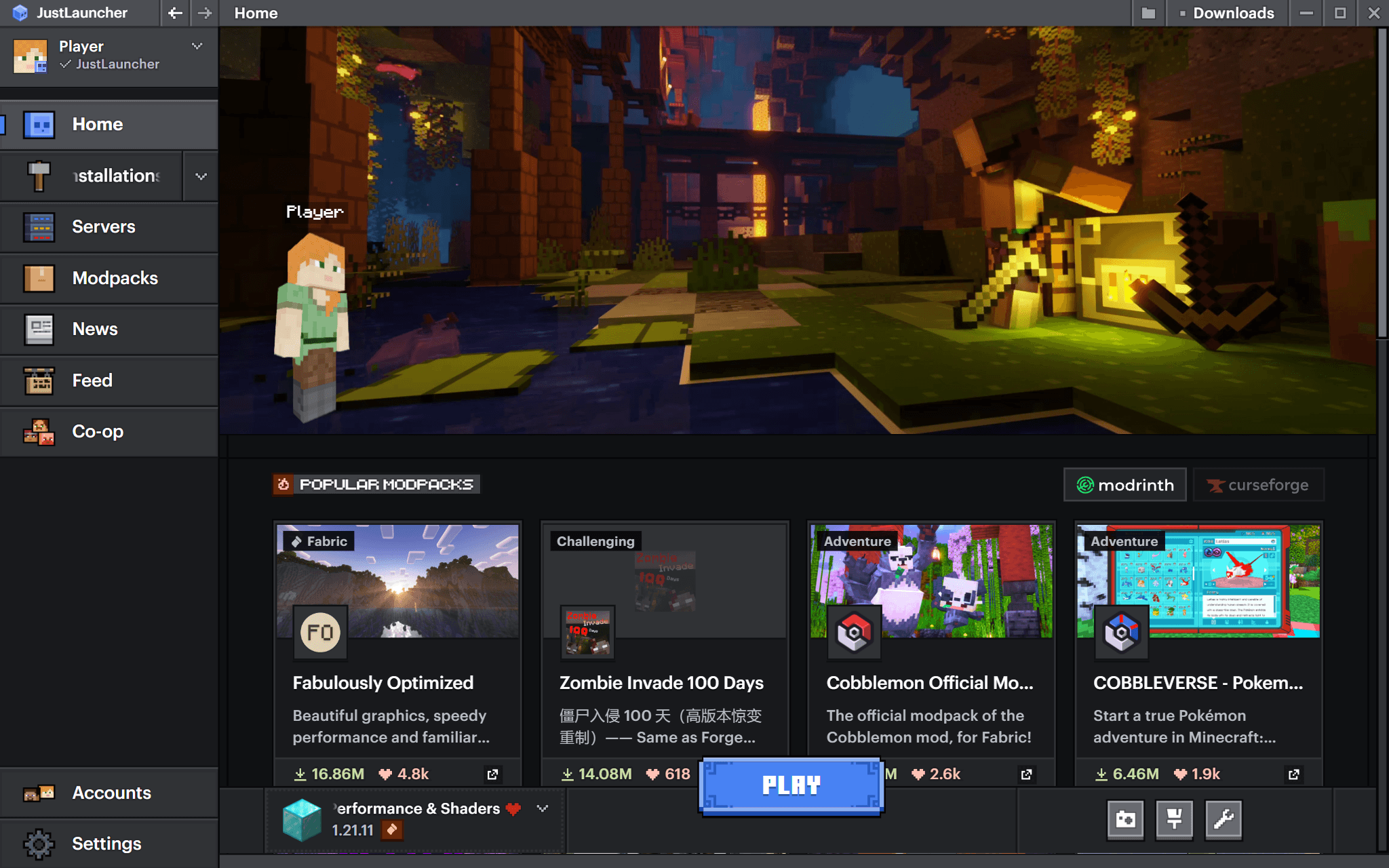
A polished, intuitive and easy way to manage everything Minecraft. JustLauncher is just better.
Download JustLauncher
FEATURES
Play Minecraft with ease
Don't waste any more time managing your game files.
Familiar and intuitive interface
Don't be stuck searching for a button, it's right there!
Tired of dragging mod files between version folders?
Well, good news! JustLauncher will do it for you.
Install popular modpacks in just one click
Play only on the best modpacks from the most popular websites.
Advanced settings
Use all the features of Minecraft.
LOADING
CLICK TO REVEAL THE ANSWERS
Frequently asked questions
Is it free?
Yes! JustLauncher is completely free. All you need to do is install it, create an account with any nickname, and click the play button. It's that simple.
Download JustLauncher
Will it run on a weak PC?
The launcher itself is light: Windows 7, 8, 10 or 11, 4 GB of RAM and 1 GB of free disk space. Java does not need a separate install — the launcher downloads whichever version the chosen release of the game needs.
After that it comes down to the Minecraft version: older releases run on very modest hardware. How much memory to give the game is a setting in the launcher, and it suggests a recommended value for your computer.
After that it comes down to the Minecraft version: older releases run on very modest hardware. How much memory to give the game is a setting in the launcher, and it suggests a recommended value for your computer.
Will I be able to install Forge and Fabric mods?
Of course! We provide ready-to-use installations for Forge, Fabric, and OptiFine. You can add your own mods by dragging and dropping them into JustLauncher, or use the built-in mod search for automatic installation and configuration.
You can also download mod packs created by other players. In that case, you just need to install the modpack, and it will be ready to play without needing any additional configuration.
You can also download mod packs created by other players. In that case, you just need to install the modpack, and it will be ready to play without needing any additional configuration.
Can I bring my instances over from another launcher?
Yes. JustLauncher finds your installed launchers on its own — TLauncher, Legacy Launcher, PrismLauncher, MultiMC, CurseForge, Modrinth, ATLauncher, GDLauncher and the official one — and moves instances across together with their mods, worlds, resource packs and settings.
How to move your instances
If something breaks, will you help me?
Yes. Join our Telegram channel: we or other community members will help you with any question you might have.
Can I play Minecraft without a licence?
JustLauncher does allow you to try Minecraft without purchasing the game.
But if you enjoy playing Minecraft and have spent hundreds of hours of your life doing so, why not fully enjoy the game and buy it? You won't need to install anything else, as JustLauncher also supports official Microsoft and Mojang accounts. 😉
But if you enjoy playing Minecraft and have spent hundreds of hours of your life doing so, why not fully enjoy the game and buy it? You won't need to install anything else, as JustLauncher also supports official Microsoft and Mojang accounts. 😉
Is JustLauncher safe to use?
Yep. JustLauncher doesn't require an internet connection, doesn't encrypt your files, and doesn't mine cryptocurrency.
I have some other question...
Visit our Help Center to find more detailed answers to other popular questions:
Help Center
WORK IN PROGRESS
JustLauncher is under active development
But you can already try out the very first versions of the launcher!
Download